
Finding a way to trust AI as an academic researcher can be hard. Anara AI (formerly Unriddle AI) is a reliable tool for information extraction in research and a powerful aid to accelerate the literature review process. By using the sources you upload and providing citations for its AI-generated content, Anara gives students and academics confidence in how its answers are computed. In this review, we explore whether Anara offers a more trustworthy and time-saving way to integrate AI into the research process, without compromising on academic rigor.
Learn the foundational systems researchers are rarely taught: from powerful note-taking and knowledge management methods to modern lit review tools, ethical AI and productive research workflows.
What is Anara?
2026 UpdateAnara has expanded significantly since this review was first published. It is no longer just a citation-aware chat tool for analysing papers: newer features include structured information extraction from multiple documents; spreadsheet analysis through Sheets; reusable prompt “Skills”; a Mac desktop app; and MCP integration. Higher-tier plans also include tools such as Model Council and Deep Search for more complex research tasks. That said, the core strength discussed in this review remains central to the product.
Anara (formerly Unriddle AI) is a AI research tool built to help you understand dense scientific material (like academic papers, books, lecture recordings, etc.) while keeping everything organised and traceable. Anara is a great tool to use for literature review in order to quickly analyse papers you’ve already collected, chat with your existing library, and explore research more efficiently.
In a landscape crowded with AI tools claiming to “revolutionise” academic work, Anara takes a more grounded approach by supporting, not replacing, a researcher’s expertise. It uses what you upload and links every response to its source, giving you control over what’s referenced.

Anara AI has a diverse set of functionality for researchers, including key features like:
- Bulk uploads: Import PDFs, handwritten documents, and audio/video files; ensuring a comprehensive research library.
- Cite-aware AI chat: Get answers with fully clickable, source-linked references.
- Cross-document querying: Track themes or arguments across multiple sources effortlessly.
- Collaboration tools: Work in research teams simultaneously within the same workspace.
- Search and autocomplete: Surface relevant information faster with smart search functionality.

Anara AI Review
What sets Anara apart from other AI tools on the market is it’s transparency and commitment to keeping the researcher at the centre of the process. We’ll go through an example literature review exploration using Anara to demonstrate how it differs from other tools.
In particular, we’ll use Anara’s folder-chat feature, allowing it to analyse and cross-reference multiple documents at once. This type of analysis is especially relevant for literature reviews, by letting us answer questions based on specific groups of papers and sources.
We explore using Anara in a key academic workflow: comparing sources, identifying themes, and contributing new ideas. This is the foundation for literature reviews and thesis writing. The infographic below shows the step-by-step process of this research process. Let’s see if Anara can support this process in a way that helps academics streamline research to generate ideas more efficiently.

Step 1: Upload sources to Anara and create a folder
First, we’re going to “train” Anara using all of our sources. In this example, we’ll focus on research papers, but you can upload any relevant sources you wish.
Create a new Folder in Anara, and then import your papers (PDFs) into it by clicking the plus sign at the top. You’ll have options like “File Upload” and “Import”. You can also drag and drop PDFs directly. The paid version of Anara also lets you import directly from your Zotero, Mendeley, Google Drive, Notion, OneDrive or SharePoint. In fact, compared to other AI tools, Anara’s list of integrations is extensive, but they all require some sort of paid plan to access.
After putting your sources into a folder, you can use the chat feature to analyse them collectively. This is great for cross-referencing and comparative analysis.

Step 2: Chat within folder
After creating a group, you can use the chat to draw insights from the collective papers. You can use the @mention feature allows you to reference specific papers or groups in a prompt. This feature ensures the chat is pulling from the correct source and offers added precision in multi-document analysis.
Here are some example prompts we tested in Anara:
- “Identify contradicting papers with evidence and justification”: Get relevant insights, supported claims with linked citations, and nuanced comparisons and flagged points of disagreement across papers.
- “What limitations are found in @paper 1?” followed by “How does this compare to @paper 2?” : Uses specific source to answer questions.

Step 3: View source PDF from citations
Each response in the chat is supported by a hyperlinked citation. These point directly to where in your source PDFs it got the answer from.
Based on our evaluation, citations are consistently accurate and contextually relevant (which is no small feat for an AI tool in the academic space!). When asked to justify claims, Anara pulls references from the correct documents, and highlights relevant sections within the paper. This traceability adds a layer of transparency, making it easier to fact-check and follow up.
That said, the tool occasionally defaults to repeating the same citation multiple times across responses. With broader or vaguer prompts, this repetition becomes more noticeable. The fix? Be more specific with your prompts. When nudged in the right direction, Anara does surface a more diverse range of sources.

Step 4: Customise chat settings
Anara gives you some useful dials to tweak. You can choose between several large language models including GPT5, Gemini, Claude, etc. This is a rare level of flexibility in research tools, and it lets you test which model best fits your preferred tone, speed and accuracy level. We didn’t notice dramatic differences between them for research tasks, but the option to switch is still a plus.
Response length can also be adjusted.. Even short responses often include multiple citations (we counted five in a 100-word answer). The tool also does a good job of sticking to the word count while still sufficiently answering the question.
Keep in mind, both the AI and word-length features are paid-only features.
If you like the idea of having granular control over your AI output, you may want to explore another tool we’ve reviewed: SciSummary allows for highly detailed output customisations. Anara and SciSummary are similarly suited for analysing and reviewing large sets of articles for literature review.

Step 5: Take notes directly in Anara
Located in the Notes section (top right of your workspace), this feature gives you an empty canvas to jot down ideas, outlines, or summaries.
It won’t read your mind, but its responses are grounded in your source material. Even if it occasionally introduces tangents you weren’t considering, these are often useful prompts to rethink or clarify your position. It feels less like outsourcing and more like brainstorming with an unusually fast research assistant.

Is Anara AI trustworthy?
Yes, Anara is a reliable tool for synthesising academic research. Unlike most other tools out there, it lets you choose how answers are computed, by controlling the “context”. As their site explains, “Anara gives you complete control over which information sources are used in responses. Use the toggles in chat settings to customize your sources.”
To get the most reliable experience out of Anara, you can set your context to use the Library only. This ensures Anara provides information using only the papers and resources (images, audio, video, documents, etc.) that you feed it. In this mode, Anara is an easy ethical choice for researchers seeking to leverage AI without compromising academic integrity. Ethical AI use is all about maintaining your cognitive sovereignty. Anara’s control over context and citation-based answers makes it easy to maintain this sovereignty and verify results.
Anara AI Chat
One of the core features that makes Anara particularly great as a research assistant is it’s chat feature. You can chat directly with Anara AI, and choose what context it will use to answer your question:
- Library: Use the files you uploaded
- Web: Search on academic databases and the internet
- Model knowledge: Access the AI’s built-in information
You can also control the response length, or how many words it uses to answer your question.
Ask “which one of my paper covers X?” or ““what do my papers say about…?” and it’ll pull up relevant information. If you choose to use the Library-only context, it will use only your uploaded documents to answer questions. Thus, you don’t have to worry about hallucinated references. But that also means it’s only as good as your library. If your uploads are patchy or outdated, the responses will be too.
Embed Anara into Obsidian
Anara can be embedded into Obsidian using the Custom Frames plugin. After installing the plugin, you can create a new frame with Anara’s web app URL, allowing it to run inside a dedicated tab within your Obsidian workspace. This setup enables you to access Anara’s citation-linked chat and grouped document analysis alongside your existing notes. For researchers using Obsidian for linked note-taking or reference tracking, this makes it easier to move between AI-generated insights and your own annotations without switching tools.

Anara Pricing (updated 2026)
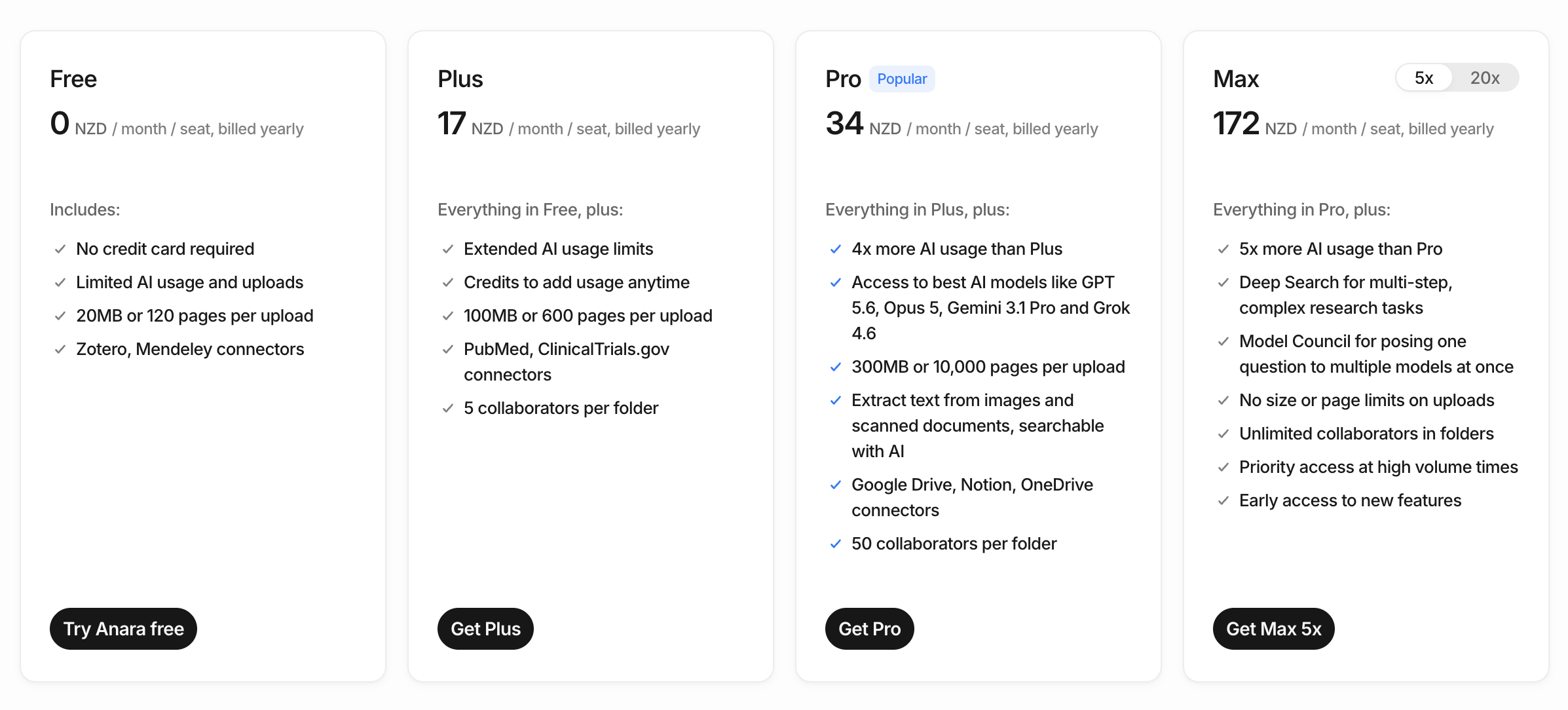
Anara is not a completely free tool, although it does offer both free and paid tiers. Its free tier is limited and is mostly useful for testing out the tool to see if it’s a good fit before puAnara offers a free plan alongside several paid tiers. The free version is useful for trying out the core workspace and seeing whether Anara fits your research workflow, while the paid plans provide more AI usage, larger imports, additional integrations and access to more advanced models and features. Anara currently offers four main plans:
- Free: Includes limited daily AI usage and uploads, with support for files up to 20MB or 120 pages. Zotero and Mendeley integrations are included, making it a surprisingly capable option for testing Anara with an existing reference library.
- Plus ($10 USD/month when billed yearly): Provides substantially more AI usage, increases the upload limit to 100MB or 600 pages, and adds integrations with research databases such as PubMed and ClinicalTrials.gov.
- Pro ($20 USD/month when billed yearly): Unlocks the full selection of AI models, including leading models from OpenAI, Anthropic and Google, along with larger uploads, OCR for scanned documents, and integrations with services such as Google Drive, Notion and OneDrive. For most researchers using Anara regularly, this is likely the most useful tier.
- Max (from $100 USD/month when billed yearly): Designed for much heavier research workloads. It provides substantially more AI usage and adds features such as Deep Search, Model Council, unlimited upload sizes and priority access during periods of high demand.
Anara now measures AI usage through a single usage meter rather than fixed word and upload allowances. Free usage refreshes daily, while paid plans refresh weekly, with additional credits available if you need more capacity.
Overall, Anara’s paid plans offer good value for researchers who regularly work with large collections of papers or want to integrate AI more deeply into their literature review workflow. The Pro plan in particular strikes the best balance between price, usage limits, model access and research integrations.
Anara Discount Code
Use my special Anara discount code to get 20% off for using the tool: ILYA20
👉 If you want to see where tools like Anara fit into a complete research workflow, start with my 21-day free guide to using AI for academics.
Is Anara worth it?
Anara is worth trying out if you’re interested in chatting with research papers you’ve already collected in order to more quickly synthesise information, build your understanding and compare & contrast papers. Anara is especially good for researchers who are concerned about excessive reliance on AI, or who want to be entirely confident in the source information the AI is trained on (thus avoiding any risk of hallucination).
Since Anara offers a free tier that allows for some experimentation, you can test it out first before committing to the premium subscription. However, the free tier is quite limited in nature, and only allows 5 uploads per day. If you need to review dozens or hundreds of papers, you need to immediately go to a paid tier to use Anara.
💡 Tip: Because of Anara’s reliance on your existing research library, it’s important to have a clear organisation of papers before using this tool. If you don’t already have a reliable reference manager that integrates well with AI tools, then go here to see our detailed review of top options including Zotero and Mendeley.
Anara vs NotebookLM
NotebookLM and Anara are both powerful AI tools that allow rapid analysis and review of dozens (or even 100s) of sources at once. After reviewing both tools in great detail, I have found that both share a lot in common when it comes to their core features and offerings.
If you’re actively learning a new topic and doing a literature review, both tools provide compelling results. If you value value a variety of output types and more generous free tier, NotebookLM is a good choice. If you want to have control over the context or which specific AI model you’re using (Claude, Gemini, etc.), then go with Anara, as it’s one of the few tools that allows this control.
👉 Learn more about using NotebookLM effectively for literature review.
How are Anara and NotebookLM similar?
Both tools allow you to:
- Summarise, connect and compare information across documents
- Get deep links into PDFs (i.e. see the exact text from the source PDF it got the answer from)
- Use a variety of inputs (PDFs, images, etc.)
- Control the “context” and choose what sources are used to provide the answer (providing control & transparency)
How are Anara and NotebookLM different?
There are some key differences between these tools:
- Output Types: Anara is focused on textual output with PDF-specific citation sourcing (I call these “deep links”). NotebookLM provides a variety of outputs including text, audio (podcasts), mind maps, reports, quizzes and even flashcards. These allow you to interact with the information through different mediums and can serve a variety of purposes (lit review, studying, etc.).
- AI Customisation: Anara lets you choose from a variety of AI models (Claude, Gemini, GPT, etc.) and to select the length of output by word count (on the paid version). NotebookLM relies only on Gemini (because it is a Google product).
- Pricing and Limits: NotebookLM has a significantly more generous free tier compared to Anara’s free tier. It allows up to 50 sources per notebook and a total of 100 notebooks per user account. Each source can be up to 500,000 words or up to 200MB for uploaded files. This is in stark contrast to Anara which allows only 10 source uploads per day.

Anara vs ChatGPT
Since Anara is built on top of GPT, it offers some of the same functionality as ChatGPT. However, ChatGPT Projects (i.e. custom GPTs you train) can also provide some of the functionality you’ll find with Anara.
ChatGPT Projects, while flexible and powerful, can feel more like a blank slate than a research workspace. With custom GPTs, you can upload documents and build a project dedicated to your topic. You can also get information cited from specific articles, although you won’t get the deep-linking available in Anara or NotebookLM.
Anara’s focus on source traceability, organisation and purpose-built features like @mentions or cite-aware chat give it a more tailored appeal. If you’re looking for a structured environment that reflects how academics work, Anara is the more research-ready option.
Summary
Anara AI is built for researchers who want help from AI without handing over the reins. It keeps things grounded, only using your uploaded sources and linking every claim back to a citation. It’s especially useful for lit reviews, theme tracking, synthesis and wrangling large reading lists. Prompting takes some precision, but if you’re after structure, transparency, and less time lost to manual sorting, Anara is a tool certainly worth exploring.
Want to learn more about other AI tools and how they compare? Check out our Tools page for a breakdown of all the most popular AI research tools available to researchers today.


