
Starting a new manuscript is daunting, even if you have 100s of notes to draw inspiration from. This workflow allows you to use AI and your notes to write your first manuscript quickly. Start with your notes and remain ethical in your use of generative AI.
Join the Effortless Newsletter. Learn how AI, digital note-taking and lit review tools can make your academic work more productive, creative, and relaxed.
This workflow starts by processing your notes and preparing them into a rough collection of arguments done section by section (i.e. introduction separate from discussion). Then, these collections are transformed into a very first rough draft using AI. Publishing this draft would be unethical, so I use it as a scaffold for creating a manuscript manually step-by-step and rely on semantic search to find additional references. The last step is to polish the draft using AI, as the changes at this stage are often minimal, this is not considered unethical.

It is essential to acknowledge the use of generative AI, describing what you used it for regardless of your approach. Check the guide on AI plagiarism for detailed info on what constitutes plagiarism and what can be detected.
Reading and Note-Taking
Note-taking is an undisputed superpower of every academic. Not only does it expand your memory, it creates new ideas by suggesting links to previously explored concepts and helps you organize big projects effortlessly, if you use a good system for your notes. The first system of any research project is, therefore, just reading slowly and picking the best literature first. The more information you have stored in your information vault, the easier it will be to use AI for writing.
For the purpose of this article I will assume that you have done your homework and have some notes ready to be used.

Collect Relevant Notes and Focal Statements
The parts that require the most work in every manuscript are (usually) the introduction and discussion sections. The former gives an overview of the entire field and where your contribution fits in, and the latter describes why your solution works. Each section consists of a series of paragraphs (around 2-5) that express a single focal statement and rectify it with citations. These focal statements are what good writing is about – choose them well, and your manuscript will read well. Your notes can help you find these. Here is the workflow:
- Collect all notes around the central problem/topic of your paper along with their references.
- Categorize these note snippets into “paragraph outlines”.
- Come up with focal statements for each paragraph outline
- Check: Doe the focal statements collectively form a story?
Here is what the end result for an intro can look like with the first two paragraphs and their focal statements in red:
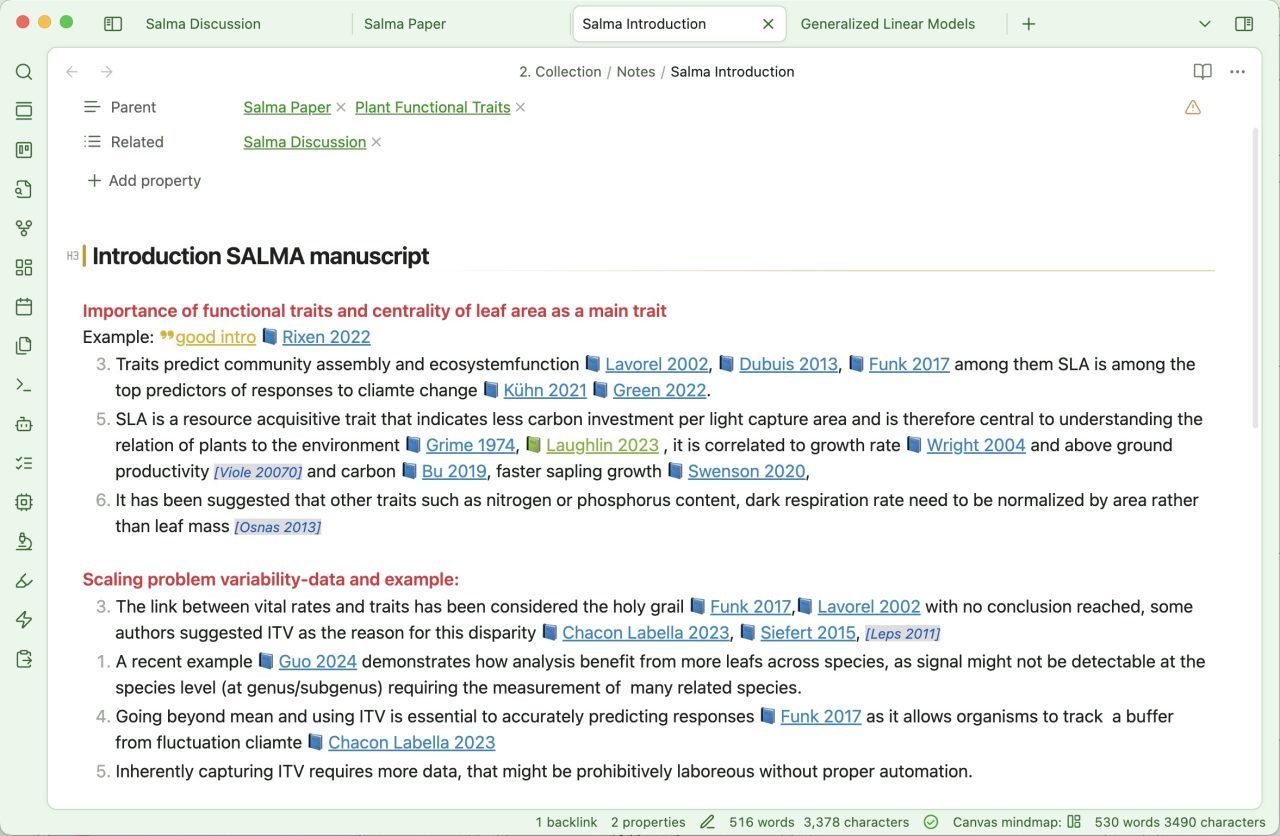
Later these focal statements can be treated as titles (that you don’t actually publish) for each of your paragraphs. Here is another example for the discussion section of the same paper (in Google Docs, where I create my manuscript):
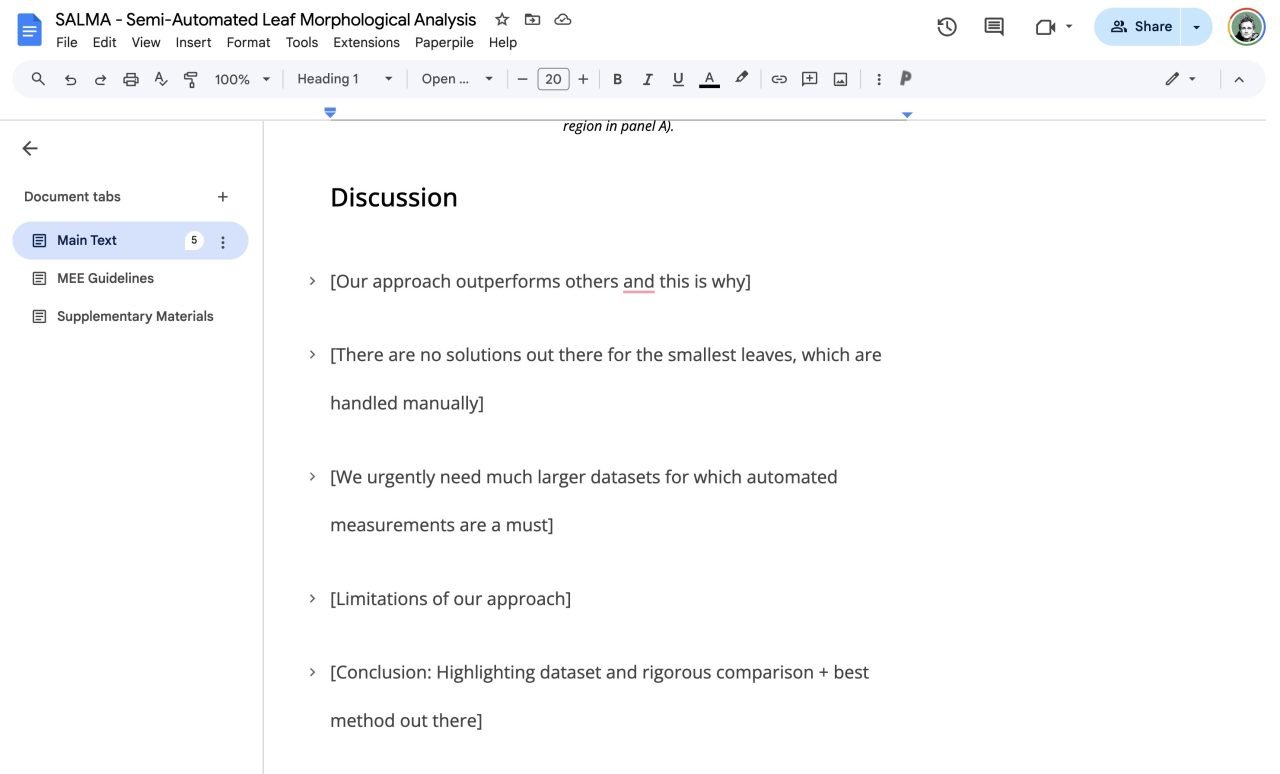
Each of the statements has a paragraph attached to it, which is currently collapsed in the screenshot. The key takeaway of this method is that each paragraph of your writing is summarised in one short sentence that together forms a narrative or a story. In addition, you have a set of notes and references that you will use as raw materials to write these paragraphs (with the help of AI).

Using ChatGPT Canvas to Create Rough Draft
Now, with a collection of notes and focal statements, you can use AI to get a draft of each paragraph. Remember that simply using AI is not allowed for most publications, so this step is only temporary. Use the generated text to get a feel for how these paragraphs can look, but heavily rephrase in your own words. Most of the time this will anyways be necessary for good academic writing. To generate the first rough draft, we will use ChatGPT’s Canvas feature, which allows us to create long texts step-by-step and edit individual parts iteratively. If you’re unfamiliar with Canvas, check out this tutorial first:
The prompt I use for the initial writing has three parts, description of the paper and where the writing goes, the focal statement and the detailed notes:
I am writing an introduction paragraph on:
""" <Describe topic of paper briefly> """
The paragraph needs to convey the following message:
""" <Paste your focal statement here> """
Here are my notes that I want you to incorporate. Use all references (in square brackets) in the intended context:
""" <Paste your bullet point notes here> """
Here is how this prompt transforms the bullet points into a good paragraph draft:
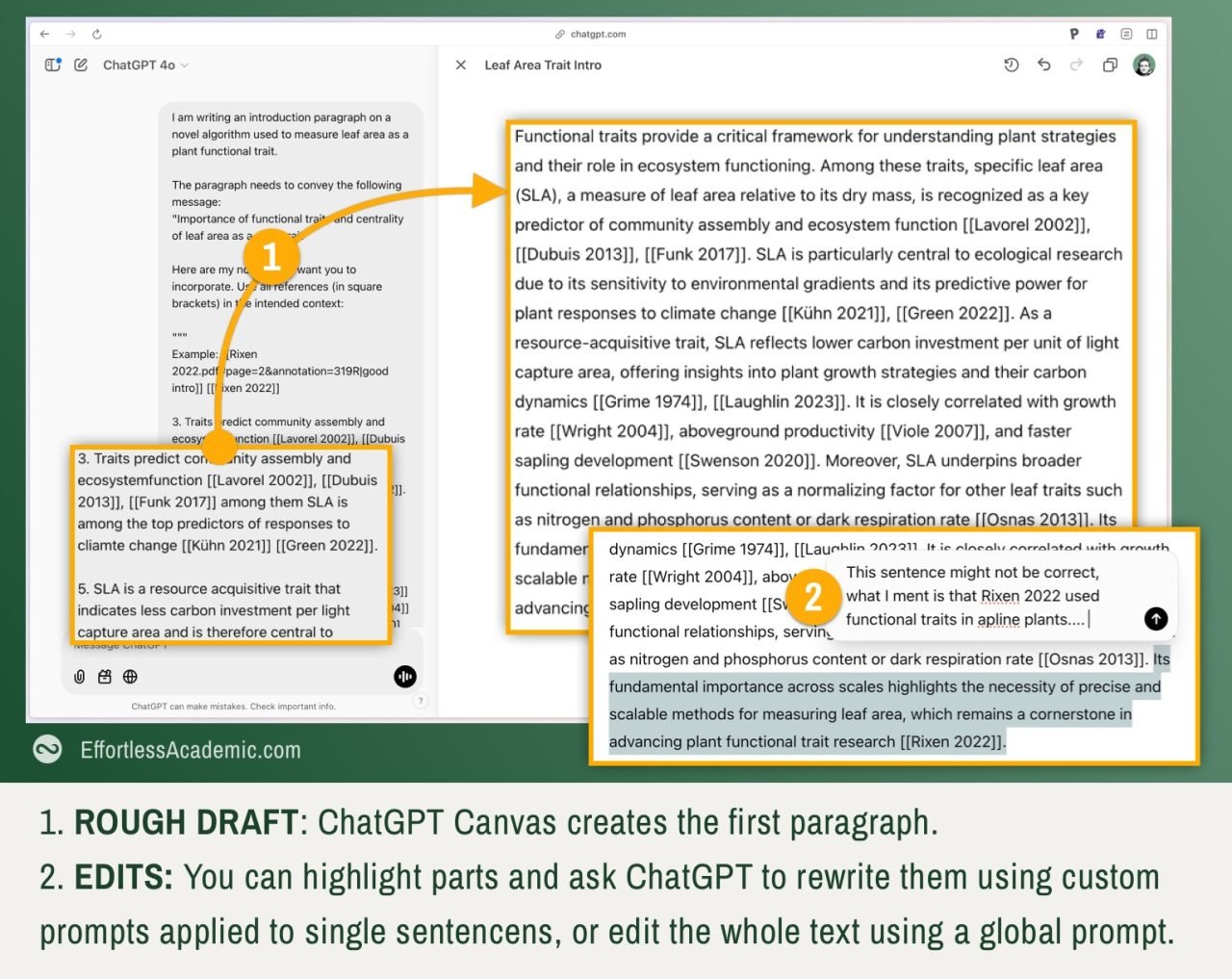
Using ChatGPT Canvas, you can repeat the prompt with the next paragraph or edit this one by highlighting the parts you think need editing or are factually incorrect. Keep in mind that ChatGPT does not have full access to your notes, so if your input is not very detailed or factually incorrect, the result will also be imperfect.
Repeat this process until you have created a good first draft of the entire introduction/discussion section. You can then copy and paste it into Google Docs to begin the actual writing phase. However, you don’t start from zero and don’t have to fear the blank page. It is advisable to copy and paste the focal statements above your paragraphs until the last part, when you send the manuscript out.
Is There an AI for Academic Writing?
There are many. Paperpal and Jenni.ai are among the most known ones. Their biggest difference is usability. Paperpal is integrated into MS Word and has many helper functions (like synonym search) built in, while Jenni approaches writing from a blank sheet and allows you to select sections and transform them using different AI prompts. Paperpal is best for polishing, and Jenni for writing. ChatGPT Canvas is, however, very flexible and can replicate a lot of the results if you give it slightly better prompts and a bit more guidance.
Check out this deep-dive on Paperpal and how it can streamline your writing:
Deep Manual Writing Work
Deep writing is the process of carefully writing every sentence of your manuscript, primarily in your own words. The AI-generated draft will look like a paper but usually have severe problems.
- It might put citations out of order
- It might make factual errors (especially if your notes were vague)
- It might overstate certain things writing an “this is…” rather than “this may…”
- It might sound overly verbose, or avoid jargon
Don’t be tempted to use this text as-is. ChatGPT is not tuned to academic writing, and neither should it do the work for you if you want to retain understanding and ownership of your work. In scientific publishing, every word matters, and it is best to write it yourself using the ChatGPT output as an idea of how a paragraph may sound. One of the best blogs on plain and straightforward scientific writing advice is the Dynamic Ecology blog.
The best tool to use is Google Docs. It’s great for collaboration, keeps track of your edits, is free and comes with plugins making your life easier. The article below will give you an overview of how to use Google Docs for academic writing:
Semantic Search to Find References
Your notes will never be complete, you will always have more studies to reference and details to mention. The most valuable companions in adding the correct references in the right context are SciSpace and/or Consensus. They are competitors, with Consensus being better in the medical domain and SciSpace being broader but not always as polished or easy to use.
Semantic search simply means to ask a plain text question to an AI and receive an answer in plain text, without going through keywords or search results and reading them like in the old days of Google search. A typical question is “Find evidence for or against the proposition …”. SciSpace and Consensus will both generate a reply paired with references you can use in your own writing.
You can use SciSpace and Consensus directly in ChatGPT’s canvas by accessing their custom GPTs. CustomGPTs refers to the ability of ChatGPT to query Consensus or SciSpace and respond based on their output. The effect is the same if you talk to the Consensus or SciSpace AIs separately.

Keep writing your manuscript using ChatGPT to help with formulating, your notes for the narrative or big picture of the writing and semantic search to find the right citations. If you need to dig deeper into the literature, the best tool to use is Litmaps and its many powerful search capabilities.
Peer Reviewing your Manuscript with AI
Once you have a mature manuscript, please don’t send it out before using an AI to peer review it. The AI can help spot gaps, weaknesses and oversights, leading to more refined manuscripts before submission. The newest Chat GPT models are particularly well suited for this, as they give more verbose and logically more sound replies. Tools like paper-wizard.com offer specialized solutions. Follow this article to get a tutorial on peer reviewing your own manuscript before submission:
Is it Ethical to use AI in Academic Writing?
Yes, if you don’t publish the output of the AI word-by-word. The reason is that AI has been trained on the works of millions of people, and its output can unintentionally paraphrase or copy their work. This would be considered plagiarism. To avoid this, use AI only early on in your writing and rewrite it manually, or just to touch up and polish single sentences and words.
Acknowledging AI for Scientific Writing
No matter how much or little you used ChatGPT the safest way to avoid any problems with journal publishers is to add a small acknowledgement paragraph. Here is a template:
We acknowledge the use of ChatGPT 4o, o1-preview and o1 models (chatgpt.com), as well as Grammarly (Grammarly.com) to generate information for background research, suggestions for improvements in writing style, outline structure, proofreading and high-level manuscript feedback. No content generated by AI technologies has been presented as our own work.
Summary
In this article, we went from a collection of loosely connected notes on a topic to a finished manuscript using AI. The steps are:
- Collect the notes and note snippets on the topic you are writing about. These are usually single sentences.
- Order these snippets and add a focal statement to summarize a few of these snippets/sentences.
- Work separately on the introduction/discussion sections. The 2-5 focal statements for each section should make logical sense and create a story or narrative.
- Copy your notes, the focal statement and a description of the paper to ChatGPT’s canvas to create draft paragraphs for the entire section.
- Copy these sections into Google Docs and start writing your paper. This can be surprisingly fast, as you already have a lot a good portion of the content from ChatGPT. Rephrase everything rigorously and do not use the raw ChatGPT output, this is plagiarism.
- Use semantic search and Litmaps to find more references as you write.
- Polish your manuscript with tools like Paperpal or ChatGPT.
- To ensure a high-quality manuscript, use AI to peer-review it.
This method allowed me to write a shorter application paper in just 3 days from notes to the first manuscript, and as AI keeps improving, this will likely become only easier.


